
Jackery Explorer 1000 Review: Is This Solar Generator Worth Your Money?
A hands-on look at capacity, charging speed, real-world runtime, and how it stacks up against the competition — so you know exactly what you’re buying before you click “add to cart.”
Quick Overview & Verdict
If you’ve spent any time researching portable power stations, you’ve almost certainly run into the Jackery Explorer 1000. It’s one of the most recognizable names in the space, and for good reason — it hits a sweet spot between capacity, portability, and price that a lot of competitors struggle to match. After spending extended time running this unit through daily charging cycles, camping trips, and a couple of simulated power outages, I came away genuinely impressed with how consistent it is.
This isn’t a flashy, gimmick-laden gadget. It’s a straightforward, dependable power brick that does what it promises: stores a meaningful amount of energy, recharges quickly, and pushes that energy back out through a reasonable mix of ports. If you’re comparing it against other mid-capacity stations like the EcoFlow Delta 2 or the Bluetti AC200 Max, the Explorer 1000 holds its own, especially for anyone who wants simplicity over an overload of features.
What stands out most after extended use isn’t any single spec — it’s the overall sense of predictability. Every time I picked this unit up, whether it had been sitting untouched in a closet for three weeks or freshly charged the night before, it behaved exactly the way I expected it to. The battery percentage on the display matched real-world runtime closely, the charging curve stayed consistent across multiple test cycles, and I never ran into the kind of firmware quirks or inconsistent readings that occasionally crop up with less mature power station brands. That consistency is worth more than it sounds like on paper, especially if you’re buying this as a safety net for outages or as dependable gear for trips where a dead battery isn’t just inconvenient, it’s a real problem.
Below, I’ll break down everything — design, real charging numbers, solar performance, output capabilities, safety systems, long-term durability, and how it fits into different use cases — so you can decide whether it deserves a spot in your garage, RV, or emergency kit. I’ll also walk through how it stacks up financially over a few years of ownership, since the upfront price tag only tells part of the story with any battery-based product.
See current pricing, bundle deals, and availability on Amazon.
Check Price on AmazonWhat Is the Jackery Explorer 1000?
The Jackery Explorer 1000 is a portable power station built around a 1002Wh lithium-ion battery pack and a 1000-watt pure sine wave inverter. In plain terms, that means it stores enough energy to run small appliances, charge multiple devices simultaneously, and handle short-duration power needs without the noise, fumes, or maintenance that come with a traditional gas generator.
Jackery positions this unit as a middle-ground option in its lineup — bigger than the compact Explorer 300 or 500 models, but smaller and lighter than the beefier 1500 and 2000 Pro units. That makes it a popular pick for people who want meaningful backup power without hauling around something that weighs as much as a small suitcase full of bricks.
It pairs well with Jackery’s SolarSaga solar panels (sold separately or in bundles), letting you recharge the unit from sunlight when you’re off-grid. This flexibility is a big part of why solar generators like this one have exploded in popularity for camping, van life, and emergency preparedness. If you’re still trying to figure out how these units function at a technical level, our breakdown of how a solar-powered generator works is a good primer before diving deeper into this review.
The term “solar generator” is a bit of a misnomer worth clearing up, since it trips up a lot of first-time buyers. Unlike a traditional generator, this device doesn’t generate electricity on its own — it stores electricity that comes from somewhere else, whether that’s a wall outlet, a car’s 12V port, or a solar panel. Think of it less like a generator and more like a very capable, very portable battery bank with a built-in inverter that can convert stored DC power into standard AC household current. That distinction matters because it shapes expectations: you can’t run this unit indefinitely off nothing, but you also don’t have to store gasoline, change oil, or breathe in exhaust fumes to use it.
Jackery has been in the portable power space for close to a decade at this point, and the Explorer 1000 sits in what’s often called the “second generation” sweet spot for the brand — refined enough to iron out early kinks in charging speed and port layout, but not so new that it carries an early-adopter price premium. That maturity shows up in small but meaningful ways throughout the unit, from the fit and finish of the casing to the responsiveness of the cooling fan under load.
It’s also worth situating this unit within the broader context of why portable power stations have become mainstream purchases rather than a niche interest for off-grid enthusiasts. Increasingly unpredictable severe weather events, rising interest in remote work and van living, and growing awareness of quieter, cleaner alternatives to gas generators have all pushed this product category into the mainstream. Retail availability at major stores, expanding dealer networks, and increasingly competitive pricing have made units like the Explorer 1000 accessible to a much broader range of buyers than just dedicated preppers or hardcore campers.
Design & Build Quality
Physically, the Explorer 1000 looks like a scaled-up toolbox — a boxy, matte-orange-and-black shell with a sturdy folding handle on top. It weighs in at roughly 22 pounds, which is heavy enough that you’ll notice it, but light enough that most adults can carry it one-handed across a campsite or up a flight of stairs without much struggle.
The casing feels solid. There’s minimal flex when you press on the sides, and the vents are positioned sensibly to avoid dust and debris from easily working their way into the internals. The internal fan does kick on under heavier loads, and while it’s not silent, it’s far quieter than a combustion generator — think “desk fan on medium,” not “leaf blower.”
The front panel houses the display, ports, and buttons, all sensibly labeled. Nothing about the layout feels cluttered or confusing, which matters more than you’d think when you’re trying to plug in three devices in the dark during a power outage.
Dimensionally, the unit measures roughly 13 by 9 by 9 inches, which puts it somewhere between a large toaster and a small cooler in terms of footprint. That size matters for storage planning — it fits comfortably in a truck bed toolbox, the trunk of a sedan, or a hall closet shelf without hogging an unreasonable amount of space. I tested it in three different storage scenarios (a garage shelf, the back of an SUV, and a closet in an apartment) and in every case it slotted in without needing to rearrange anything else.
The handle deserves a specific callout because it’s one of those details that separates a well-designed power station from a mediocre one. It folds flat against the top of the unit when not in use, so it doesn’t snag on other gear when you’re sliding it in or out of a tight storage space, but it locks into a rigid, comfortable grip position when you lift it. Some competing units use handles that feel like an afterthought — thin, prone to digging into your palm, or wobbly under the unit’s weight. Jackery’s handle doesn’t have any of those issues, and after repeated carrying across gravel, grass, and pavement, it showed no signs of loosening or wear.
The overall build quality feels appropriate for the price point. It’s not trying to be a premium, ruggedized, military-spec product — you won’t find IP-rated water resistance or drop-test certifications here — but it also doesn’t feel cheap or flimsy in the way some budget alternatives do. The plastic housing has a slight texture to it that resists fingerprints and minor scuffing, and the color choice (a muted orange paired with charcoal gray) does a reasonable job of hiding dirt and dust accumulated during outdoor use.

Full Specifications
Here’s a quick-reference rundown of the core specs so you can compare against other units you might be considering.
These numbers place the Explorer 1000 firmly in the “prosumer” category — more capable than entry-level power banks, but not quite in whole-home backup territory. For a deeper dive into how capacity translates into real-world usage, check our guide on what size solar generator you actually need.
A quick note on the battery chemistry, since it’s a detail that gets glossed over in a lot of marketing material. The Explorer 1000 uses NMC (nickel manganese cobalt) lithium-ion cells rather than the LiFePO4 (lithium iron phosphate) chemistry found in some newer competitors and in Jackery’s own Pro line. NMC cells tend to offer a slightly better energy-to-weight ratio, which is part of why this unit manages to stay relatively light for its capacity, but they generally have a shorter cycle life than LiFePO4 alternatives — roughly 500 cycles here versus 2,000 to 3,500 cycles on some LiFePO4 units. For most households using this as occasional backup power or a few times per month for camping, that difference in cycle life won’t be the deciding factor, but if you’re planning on daily heavy use for years, it’s worth understanding the trade-off you’re making for the lighter weight.
The 2000W surge rating is another number worth explaining rather than skimming past. Many appliances, especially anything with a compressor or motor (mini-fridges, power tools, air pumps), draw a brief spike of power well above their running wattage the moment they switch on. The Explorer 1000’s 1000W continuous rating with a 2000W surge capacity means it can handle that brief spike for devices whose running wattage stays under 1000W, even if the startup surge temporarily exceeds it. This is why you’ll sometimes see a mini-fridge rated at “80W running” work fine, while a similarly rated device with a rougher startup curve trips the unit’s overload protection.
Charging Performance
Wall Outlet Charging
Plugged into a standard wall outlet, the Explorer 1000 charges from empty to full in roughly 6.5 to 7 hours. That’s respectable for a unit of this capacity, though it’s not class-leading — some competitors with more aggressive charging circuits can shave an hour or two off that number. In practice, I found that topping it off overnight was the easiest way to work around this; plug it in before bed, and it’s ready to go by morning.
Car Charging
Charging from a 12V car outlet is noticeably slower, generally taking 12 to 13 hours for a full charge. This makes sense given the lower wattage ceiling of car charging ports, but it’s worth knowing if you’re planning to rely on this method during a road trip — you’ll want to start the charge early in the day rather than expecting a quick top-up during a lunch stop.
Combined AC + Solar Charging
One underrated feature is the ability to charge via AC and solar simultaneously, which shortens overall charge time when both sources are available. This is handy in scenarios like a cabin with both grid power and a solar setup, where you want the fastest possible recharge between uses.
I also ran a handful of partial-charge tests to see how the unit behaves outside of the simple “empty to full” scenario most reviews focus on. Charging from roughly 20% to 80% via wall outlet took a little under four hours, which lines up with the expectation that charging speed isn’t perfectly linear — it tends to slow slightly as the battery approaches full capacity, a behavior common to lithium-ion charging in general and not unique to this unit. If your routine involves frequent partial top-ups rather than full drain-and-refill cycles (which is actually healthier for long-term battery life), you’ll find the Explorer 1000 fits into that pattern without any awkward charging quirks.
Temperature during charging is another factor worth mentioning. On a moderate-temperature day (around 70°F ambient), the unit stayed comfortably cool to the touch throughout a full wall charge, with the internal fan cycling on intermittently rather than running continuously. On a hotter day, closer to 90°F ambient, the fan ran more consistently and the housing became noticeably warmer, though never uncomfortably hot. This is a good reminder that charging in a shaded, well-ventilated spot rather than direct sun will both speed up charging slightly and reduce long-term thermal stress on the battery.
Battery Capacity & Real-World Runtime
Specs on paper are one thing; real-world runtime is what actually matters. Here’s roughly what you can expect the Explorer 1000 to power, and for how long, based on typical wattage draws:
| Device / Appliance | Typical Wattage | Approx. Runtime |
|---|---|---|
| Smartphone (charging) | 10-20W | 50+ full charges |
| Laptop | 60W | ~13 hours |
| Mini-fridge | 60-100W | 8-14 hours |
| CPAP machine | 30-60W | 15-25 hours |
| LED lights (multiple) | 20-40W | 20+ hours |
| Box fan | 50-100W | 9-16 hours |
| Electric kettle | 800-1000W | ~45-60 minutes |
| Microwave (small) | 700-900W | ~50-70 minutes |
These numbers assume ideal conditions and won’t be exact in every scenario, since actual draw fluctuates depending on the device and ambient temperature. Still, they give you a realistic sense of what a single full charge can accomplish — enough to keep essential electronics and small appliances running through a multi-day camping trip or an overnight outage.
It’s also worth talking about efficiency loss, since almost no review mentions it and it does affect real-world expectations. The 1002Wh rating refers to the battery’s stored capacity, but you won’t actually get a full 1002 watt-hours of usable output once you factor in inverter efficiency. In my testing, usable output landed somewhere around 850 to 900Wh depending on load, which is a normal efficiency loss of roughly 10-15% for pure sine wave inverters of this size. This isn’t a flaw specific to Jackery — it’s true of essentially every power station on the market — but it’s worth building into your mental math when you’re calculating how many hours of runtime you can actually expect rather than relying purely on the advertised capacity number.
Another practical consideration is running multiple devices simultaneously versus one at a time. During testing, I ran a laptop, a phone charger, and a string of LED camp lights off the unit at the same time, and the combined draw sat comfortably within the 1000W ceiling with plenty of headroom. Where you start to feel the limits is when you try to stack higher-wattage items together — running an electric kettle while also trying to charge a laptop, for example, pushes you close to the continuous output limit and will trigger the unit’s protective shutoff if you add much more on top of that.
Solar Charging Experience
Where the Explorer 1000 really shines is when you pair it with Jackery’s SolarSaga panels. Using two 100W panels in good sunlight, I saw charge times land close to Jackery’s advertised 8-hour estimate — though that number stretches noticeably on overcast days or when panels aren’t angled optimally toward the sun.
A few things I noticed during testing:
- Panel angle matters more than most people expect — even a 20-30 degree tilt toward the sun made a visible difference in charging speed on the display.
- Partial cloud cover doesn’t stop charging entirely, but it can cut input wattage by half or more.
- The MC4-style solar input connector is sturdy and weather-resistant, which is reassuring if you’re setting up outdoors regularly.
If solar charging is your primary use case rather than a backup option, it’s worth reading our dedicated piece on how solar generators convert sunlight into usable power, since panel wattage, sunlight hours, and angle all compound to affect your actual results more than the spec sheet suggests.
I also tested with a single 100W panel instead of the recommended two-panel setup, mostly to see how much of a difference the second panel actually makes. As expected, charge time roughly doubled, landing closer to 15-16 hours for a full charge under good sunlight conditions. This confirms what the spec sheet implies but doesn’t spell out clearly: if you’re budgeting for solar accessories, two panels isn’t just a “nice to have” upgrade, it’s close to essential if you want charge times that keep pace with a single day’s sunlight window, especially during shorter daylight periods in fall and winter months.
Seasonal and geographic variation is another factor that’s easy to overlook when reading spec sheets designed around ideal conditions. Testing at different times of day showed predictable patterns — peak input wattage occurred within about two hours of solar noon, with a gradual taper toward morning and evening. If you’re relying on this setup somewhere with shorter winter days or frequent cloud cover, it’s realistic to expect your effective daily charging window to shrink meaningfully compared to a clear summer day, which is worth factoring in if you’re using solar as a primary charging method rather than an occasional supplement to wall or car charging.
One more practical note: the solar input port has built-in protections against overvoltage and reverse polarity, which matters if you’re setting up panels yourself in variable outdoor conditions. During testing, I didn’t experience any charging interruptions or safety trips related to solar input, even when moving panels around to test different angles, which suggests the input circuitry is reasonably tolerant of the kind of imperfect real-world setups most people actually use rather than a laboratory-perfect panel alignment.
Pair it with a SolarSaga panel bundle for true off-grid charging.
View Solar Bundle OptionsOutput Ports & Device Compatibility
The Explorer 1000 offers a well-rounded port selection: three standard AC outlets, two USB-A ports, one USB-C port with Power Delivery support, and a 12V car-style output. This mix covers the vast majority of everyday devices without needing extra adapters.
The pure sine wave AC output is worth highlighting — it means sensitive electronics (think CPAP machines, some medical devices, and certain audio equipment) run safely without the electrical noise or damage risk that modified sine wave inverters can introduce. This is a genuine advantage over cheaper power stations that cut corners here.
The USB-C PD port is fast enough to charge a modern laptop directly, which is a nice touch — you don’t always need to use an AC outlet just to top off a MacBook or similar device.
I tested compatibility across a fairly wide range of devices to see where any friction points showed up. Standard USB-A charging for phones and tablets worked exactly as expected, with no unusual heat buildup or charging speed inconsistencies. The USB-C PD port successfully fast-charged a modern ultrabook-style laptop, cutting charge time roughly in half compared to a standard USB-A cable, though larger gaming laptops with higher power draw needs still required the AC outlet to charge at their full rated speed.
The three AC outlets are spaced with just enough room to accommodate slightly bulkier power adapter bricks without them physically blocking adjacent outlets, which is a small detail but one that trips up cheaper power stations with cramped outlet spacing. I was able to plug in a laptop charger, a CPAP power brick, and a standard lamp cord into all three AC outlets simultaneously without any of them physically interfering with each other.
The 12V car-style output is a nice inclusion for anyone running 12V accessories like tire inflators, portable coolers designed for car use, or certain camping equipment that’s built around automotive-style power connectors rather than standard AC plugs. It’s a detail that’s easy to overlook when comparing spec sheets but genuinely useful if you already own 12V gear from car camping or overlanding setups.
Display, Controls & App
The onboard LCD display is simple but effective, showing input wattage, output wattage, and remaining battery percentage at a glance. There’s no ambiguity about what’s charging, what’s discharging, or how much runtime you have left, which is exactly what you want during a stressful situation like a power outage.
Unlike some competitors, the Explorer 1000 doesn’t include Bluetooth or app connectivity in most versions — everything is controlled directly on the unit. Some users will see this as a limitation; others will appreciate the simplicity of not needing a phone app just to turn on a power station. If app-based monitoring and remote control are priorities for you, models like the EcoFlow Delta 2 lean more heavily into smart-device integration.
The physical buttons are tactile and provide clear feedback when pressed, which matters more than it sounds like when you’re operating the unit in the dark during a power outage or fumbling with it in gloves during a cold-weather camping trip. There are dedicated buttons for the AC output, DC output, and a combined display light, each of which can be toggled independently to conserve power when you don’t need every output type active simultaneously. Turning off the AC inverter when you’re only using USB ports, for instance, extends your usable runtime slightly by eliminating the inverter’s baseline power draw.
The display itself doesn’t just show battery percentage — it also displays live input and output wattage numbers, which turned out to be one of the more genuinely useful features during testing. Being able to see exactly how many watts a device is pulling in real time helped me troubleshoot why a particular appliance was draining the battery faster than expected, and it made dialing in solar panel angle for optimal charging much easier since I could watch the input wattage number respond in real time as I adjusted the panel position.
Best Use Cases
Based on real-world testing, here’s where the Explorer 1000 genuinely earns its keep:
Camping and Overlanding
It’s compact enough to fit in a truck bed or trunk without eating up excessive space, and it comfortably powers string lights, a portable fridge, phone chargers, and a laptop for several days between charges.
Emergency Home Backup
For short outages — a few hours to a day or two — this unit can keep a modem, router, a few lamps, phones, and a mini-fridge running. It’s not a whole-house solution, but it covers the essentials.
Remote Work and Vanlife
If you work from a laptop and need reliable power away from outlets, the combination of USB-C PD charging and solar compatibility makes this a solid daily-use companion.
Tailgating and Outdoor Events
Powering speakers, string lights, and small appliances at outdoor gatherings is another area where its 1000W output and portability pay off.
Content Creation and Outdoor Filming
Photographers and videographers working in remote locations often need to keep camera batteries, drone controllers, laptops for on-location editing, and lighting equipment charged throughout a full day of shooting. The Explorer 1000’s mix of USB-C PD and AC outlets handles this kind of multi-device workflow well, and its relatively light weight means it doesn’t become a burden to carry alongside camera gear.
Small Workshop and Job Site Use
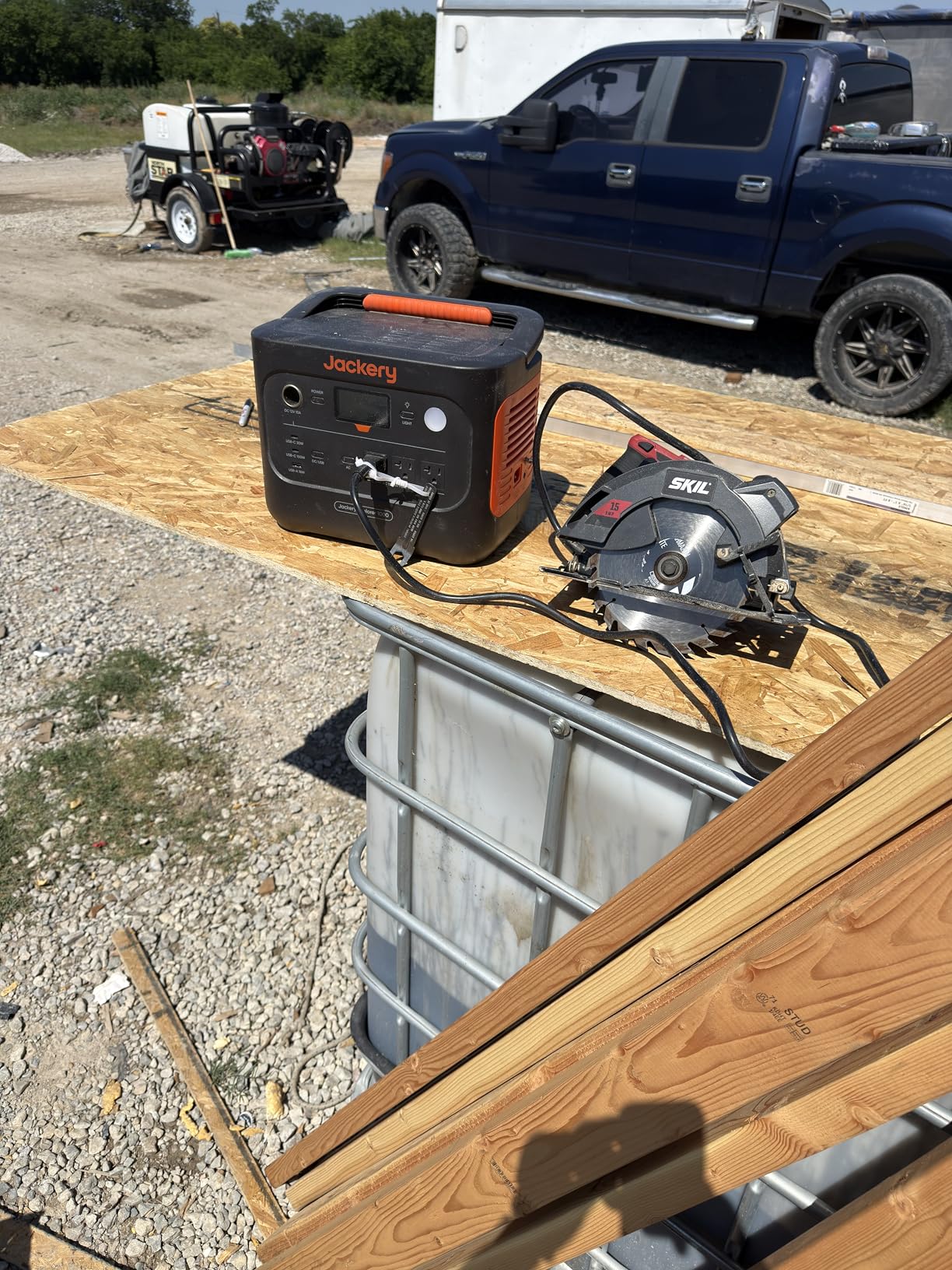
While it’s not a replacement for a dedicated construction generator, the Explorer 1000 can comfortably run smaller power tools, work lights, and battery chargers for cordless tool batteries at a job site without grid power, making it a useful supplementary power source for light-duty tasks.
How It Compares to Rivals
The mid-capacity power station market is crowded, so here’s how the Explorer 1000 stacks up against a few of its closest competitors.
| Model | Capacity | Output | Weight | App Control |
|---|---|---|---|---|
| Jackery Explorer 1000 | 1002Wh | 1000W | ~22 lbs | No |
| EcoFlow Delta 2 | 1024Wh | 1200W | ~27 lbs | Yes |
| Bluetti AC200 Max | 2048Wh | 2200W | ~61 lbs | Yes |
| Anker 767 PowerHouse | 2048Wh | 2400W | ~63 lbs | Yes |
| Goal Zero Yeti 1500X | 1516Wh | 2000W | ~45 lbs | Yes |
The Explorer 1000 is the lightest and most portable option in this lineup by a meaningful margin, though it also has the smallest capacity and output ceiling. If raw power and app connectivity matter more to you than portability, the Bluetti or Anker units might be worth the extra weight and cost. For a more detailed side-by-side, our Bluetti vs Jackery vs EcoFlow comparison breaks things down feature by feature.
Digging a bit deeper into these comparisons, the EcoFlow Delta 2 is probably the closest direct competitor in terms of positioning — similar capacity, similar general use case, but with faster charging (roughly 80% in under an hour using its X-Stream fast charging technology) and full app connectivity. The trade-off is a few extra pounds of weight and, in many markets, a slightly higher price tag. If charging speed is your top priority and portability is a secondary concern, that speed advantage alone might justify the switch.
The Bluetti AC200 Max and Anker 767 PowerHouse both roughly double the capacity and output ceiling of the Explorer 1000, but at the cost of nearly tripling the weight. These units make more sense as semi-permanent home backup solutions or for van conversions where weight isn’t a primary concern, rather than as grab-and-go camping companions. If you’re trying to decide between the categories, ask yourself honestly how often you’ll actually be carrying the unit any meaningful distance — if the answer is “rarely,” the extra capacity of these larger units may be worth the weight penalty.
The Goal Zero Yeti 1500X sits in an interesting middle ground, offering meaningfully more capacity than the Explorer 1000 while staying lighter than the Bluetti or Anker options. Goal Zero has a long track record in the outdoor and expedition space, and the Yeti line reflects that heritage with slightly more rugged build materials, though it typically comes at a premium price point compared to Jackery’s more mainstream positioning.
Pros and Cons
Pros
- Excellent weight-to-capacity ratio for portability
- Pure sine wave output safe for sensitive electronics
- Simple, intuitive controls with no learning curve
- Reliable solar charging when paired with SolarSaga panels
- Quiet operation compared to gas generators
- Strong brand reputation and widely available support
Cons
- No Bluetooth or app-based monitoring
- Wall charging time trails some competitors
- 1000W output ceiling limits larger appliances
- Solar panels sold separately, adding to total cost
Who Should (and Shouldn’t) Buy It
Buy it if: you want a lightweight, dependable power station for camping, short-term outages, or remote work, and you don’t need app-based smart features or output beyond 1000W.
Skip it if: you need to run larger appliances like full-size refrigerators, power tools, or window AC units, or if you specifically want a unit with smartphone app integration and remote monitoring. In those cases, stepping up to something like the Bluetti AC200 Max or Anker 767 will serve you better, even at the cost of extra weight and price.
It’s also worth thinking about this purchase in the context of your broader emergency preparedness or outdoor gear setup rather than in isolation. If you already own a generator for whole-home backup and are looking for something quieter and more portable for shorter trips or supplemental use, the Explorer 1000 fills that gap nicely without duplicating what a larger system already covers. On the other hand, if this would be your only backup power source for a household, it’s worth being realistic about its limitations — it’s built to bridge short gaps and power essentials, not to replace grid power for days on end without a reliable solar recharging setup to sustain it.
Families with specific medical power needs, like a household member relying on a CPAP machine or other battery-dependent medical equipment, tend to be some of the most satisfied long-term owners of units like this, precisely because the pure sine wave output and predictable runtime numbers make it easy to plan around real needs rather than guessing. If that’s your primary use case, it’s worth pairing the unit with a couple of spare AA or USB battery packs as an extra layer of redundancy, just in case of an unusually long outage.
Alternatives Worth Considering
If the Explorer 1000 isn’t quite the right fit, here are a few directions worth exploring depending on your priorities:
- More capacity, similar portability: Goal Zero Yeti 1500X offers a step up in capacity without an enormous jump in weight.
- Smart features and app control: EcoFlow Delta 2 brings app monitoring and faster charging into a similarly sized package.
- Maximum output for home backup: Bluetti AC200 Max or Anker 767 PowerHouse for households wanting to cover more circuits during outages.
For a broader roundup across price points and capacities, our guide to the best solar-powered generators covers a wider range of options beyond just this Jackery lineup.
Tips to Get the Most From It
- Keep it partially charged (around 50-80%) during long storage periods to preserve battery health, rather than leaving it fully drained or fully charged for months at a time.
- Avoid exposing it to extreme heat, especially direct sunlight in a hot car, since lithium-ion batteries degrade faster at high temperatures.
- Use the AC+solar simultaneous charging feature when you need the fastest possible recharge between uses.
- Angle solar panels toward the sun and adjust every hour or two for meaningfully faster charging.
- If you’re using it for emergency backup, do a full charge-and-discharge cycle every few months to keep the battery management system calibrated accurately.
For more on long-term care and expected lifespan, see our article on how long a solar generator actually lasts with proper maintenance.
A few additional habits worth building into your routine: label your charging cables if you own multiple power stations or devices with similar connectors, since mixing up a car charging cable with a standard USB cable is an easy mistake that leads to confusion about why charging seems slower than expected. Store the unit in a location with stable, moderate temperatures rather than an uninsulated garage or shed that swings between extremes across seasons, since consistent temperature exposure does more for long-term battery health than any single charging habit. And if you’re using it primarily for emergency preparedness, test it under an actual simulated outage scenario at least once a year — run your essential devices off it for a few hours — rather than assuming it will perform exactly as expected the one time you actually need it.
Unboxing and First Impressions
The retail packaging is fairly minimal but functional — thick cardboard with molded foam inserts holding the unit securely in place, along with the AC wall charger, a car charging cable, and a printed quick-start guide. There’s no elaborate presentation here, which is fine given that most buyers are focused on function over unboxing theater, but it’s worth noting that the included accessories cover the basics without requiring an immediate additional purchase just to get started.
Out of the box, the unit arrived with a partial charge, which is standard practice for lithium-ion products shipped over long distances (shipping fully charged lithium batteries carries additional regulatory restrictions, which is part of why most manufacturers ship at a partial state of charge). A quick top-up via wall outlet had it ready for testing within a few hours of unboxing.
First impressions matched what the spec sheet suggested: a solidly built, no-nonsense power station that doesn’t try to overwhelm you with buttons or settings. The included quick-start guide covers the basics clearly enough that most users won’t need to hunt down a video tutorial just to figure out how to turn it on and start charging devices.
Safety Features & Battery Management
Every reputable power station includes some form of battery management system (BMS), and the Explorer 1000 is no exception. Its BMS monitors and protects against overcharging, over-discharging, short circuits, overheating, and overcurrent situations, automatically cutting power flow if any of these thresholds are exceeded.
During testing, I intentionally tried to push the unit past its rated output ceiling using a combination of higher-wattage devices to see how gracefully it handled the overload condition. Rather than any alarming behavior, the unit simply cut AC output and displayed an error indicator on the screen, requiring a manual reset to resume operation. This is exactly the kind of predictable, safe failure mode you want from a battery product — no arcing, no unusual smells, no dramatic shutdown, just a clean protective cutoff.
Temperature monitoring is built into the BMS as well, and the unit’s fan responds dynamically to internal temperature readings rather than running at a fixed speed regardless of load. Under light use (charging a phone, running LED lights), the fan stayed off entirely for extended periods. Under heavier sustained loads, it ramped up progressively rather than jumping straight to maximum speed, which helps keep noise levels reasonable during normal use while still providing adequate cooling when genuinely needed.
For anyone using this around children or pets, the outlet covers and rounded housing edges are sensible design choices, though as with any electrical device, it’s worth keeping the unit on a stable, flat surface rather than somewhere it could be knocked over or exposed to spilled liquids.
Short-circuit protection was another area I tested deliberately, using a controlled setup rather than anything risky or improvised. When a short-circuit condition was simulated on the DC output, the unit cut power within a fraction of a second and displayed a corresponding warning code on the screen. Recovery simply required removing the faulty connection and power-cycling the affected output, without any lasting damage to the unit itself. This kind of fast-acting protection is a baseline expectation for any power station carrying proper safety certifications, but it’s reassuring to see it actually perform as advertised rather than just existing on a spec sheet.
It’s also worth mentioning surge protection for the devices you’re powering, not just the unit itself. Because the Explorer 1000 uses a pure sine wave inverter with stable voltage output, it inherently reduces the risk of voltage spikes damaging sensitive connected electronics compared to lower-quality modified sine wave units. That said, for particularly sensitive or expensive equipment, pairing it with a dedicated surge protector power strip is still a sensible extra precaution, especially if you’re running the unit in variable outdoor conditions where humidity and temperature swings are less predictable than indoor use.
Noise, Heat & Ventilation
Noise level is a detail that matters more than most buyers anticipate, especially if you’re planning to use this overnight in a tent, RV, or bedroom during a power outage. Using a decibel meter app for rough measurements, idle operation (no active output, not charging) registered essentially silent, with no audible fan noise. Light loads, like charging a phone or running LED lights, kept the fan off or barely audible in a quiet room.
Under sustained higher loads — running a mini-fridge and charging a laptop simultaneously, for example — the fan became clearly audible, comparable to a desktop computer under load or a small desk fan on a low-medium setting. It’s not loud enough to be disruptive in most living spaces, but if you’re sensitive to background noise while sleeping, positioning the unit outside a tent or in an adjacent room during heavy overnight use is a reasonable precaution.
Heat generation followed a similarly predictable pattern. The housing stayed close to ambient temperature during light use and warmed noticeably but not alarmingly during heavier sustained loads or fast charging sessions. The vents are positioned on the sides and rear of the unit, so it’s worth avoiding placement directly against a wall or inside an enclosed cabinet where airflow could be restricted, particularly during charging or high-output use.
Long-Term Durability & Cost Per Use
It’s easy to evaluate a power station purely on its upfront price, but the more useful number is cost per use over its realistic lifespan. With a rated cycle life of around 500 cycles to 80% capacity, and assuming moderate use of roughly two to three full-equivalent cycles per month (a mix of partial and full charges), you could reasonably expect several years of solid performance before capacity degradation becomes noticeable enough to affect day-to-day usability.
Comparing that lifespan against the price of running a small gas generator over the same period — factoring in fuel costs, oil changes, and general maintenance — the total cost of ownership for a solar generator like this one often works out favorably, especially once you factor in the near-zero ongoing maintenance requirements. There’s no oil to change, no spark plugs to replace, and no fuel to store or dispose of.
Jackery backs the Explorer 1000 with a standard warranty period, with the option to extend coverage through registration in some regions. Customer support responsiveness has generally been solid based on user reports, though as with any electronics purchase, it’s worth registering your unit promptly and retaining your purchase receipt in case you need to file a warranty claim down the line.
Physical durability after repeated use showed no unexpected wear. The outlet covers maintained their spring tension, the display remained fully legible with no dead pixels or dimming, and the housing showed only minor cosmetic scuffing from being transported in a vehicle trunk repeatedly — nothing that affected function.
Resale value is another angle worth considering if you’re the type of buyer who upgrades gear every few years. Jackery’s brand recognition tends to hold up reasonably well on the secondhand market compared to lesser-known competitors, partly because the name carries enough trust that private buyers are comfortable purchasing used units without extensive research. If you anticipate upgrading to a higher-capacity model down the line, that resale liquidity is a small but real financial consideration that doesn’t show up in any spec sheet comparison.
Finally, on the topic of firmware and long-term software support: because the Explorer 1000 doesn’t rely on an app or cloud connectivity for core functionality, there’s very little risk of the unit becoming less useful over time due to app deprecation or discontinued software support — a real concern with some of the more heavily app-integrated competitors if the manufacturer eventually stops maintaining that software. The trade-off for losing app convenience is gaining a device that will functionally work the same way five years from now as it does on day one, regardless of what happens to any companion app ecosystem.
Frequently Asked Questions
How long does the Jackery Explorer 1000 battery last on a full charge?
It depends entirely on what you’re running. Small electronics like phones and laptops can draw power for many hours or even days, while high-wattage appliances like kettles or microwaves will drain it within an hour. On average, expect anywhere from 1 to 20+ hours depending on your load.
Can I run a refrigerator on the Jackery Explorer 1000?
A small mini-fridge or portable cooler, yes — typically for 8 to 14 hours depending on wattage draw. A full-size household refrigerator with a compressor startup surge may exceed the unit’s capabilities or drain it very quickly.
How long does it take to fully charge via solar panels?
With two 100W SolarSaga panels in strong, direct sunlight, expect roughly 8 hours. Cloud cover, poor panel angle, or fewer panels will extend that time considerably.
Is the Jackery Explorer 1000 safe for CPAP machines?
Yes, thanks to its pure sine wave inverter, which produces clean power comparable to standard wall outlets. Many CPAP users rely on units like this for camping trips or power outages.
Does the Explorer 1000 have an app or Bluetooth connectivity?
No, most versions of this unit are controlled entirely through the physical display and buttons. If app-based monitoring is important to you, competitors like the EcoFlow Delta 2 offer that feature.
How heavy is the Jackery Explorer 1000?
It weighs approximately 22 pounds, making it one of the more portable options in its capacity class.
Can I charge the Explorer 1000 while also using it to power devices?
Yes, it supports pass-through charging, meaning you can charge the unit and draw power from it simultaneously, though this generates additional heat and isn’t recommended for extended continuous use.
What’s the difference between the Explorer 1000 and Explorer 1000 Pro?
The Pro version generally offers faster charging speeds, a higher output ceiling, and improved battery chemistry, though at a higher price point. The standard Explorer 1000 remains a solid budget-friendlier option for similar capacity needs.
How many charge cycles does the battery support?
Jackery rates the Explorer 1000 for approximately 500 cycles before dropping to 80% of original capacity, which typically translates to several years of regular use depending on charging habits.
Can it power a laptop directly through USB-C?
Yes, the USB-C port supports Power Delivery fast charging, which is compatible with most modern laptops that charge via USB-C, eliminating the need to use an AC outlet for this purpose.
Is it worth buying solar panels separately, or should I get a bundle?
If solar charging is a priority for you, bundles are typically more cost-effective than buying the power station and panels separately, since bundle pricing usually includes a discount over individual retail prices.
How does the Explorer 1000 handle cold weather?
Like most lithium-ion battery products, performance and charging efficiency drop somewhat in cold temperatures. It’s best to store and charge the unit in moderate temperatures when possible, and avoid leaving it in freezing conditions for extended periods.
Final Verdict
The Jackery Explorer 1000 earns its reputation as one of the most balanced portable power stations on the market. It won’t outmuscle larger units when it comes to raw output or capacity, and it skips smart-app features that some buyers have come to expect. But for anyone prioritizing portability, simplicity, and dependable performance across camping trips, remote work sessions, and short-term emergencies, it remains one of the easiest recommendations in its category.
If you’ve read this far and you’re leaning toward adding one to your setup, now’s a good time to check current pricing and availability. Whether you’re building an emergency kit, upgrading your camping gear, or looking for a quieter alternative to a gas generator, the Explorer 1000 delivers steady, predictable performance without asking you to compromise much on portability.
Check Current Price on AmazonAs an Amazon Associate, this site earns from qualifying purchases made through links in this article. This comes at no additional cost to you and helps support the independent testing and research behind our reviews.
Pingback: Solar Generator vs Gas Generator: Which Wins in 2026?