Eufy SoloCam S340 Review: Is This Dual-Lens Solar Camera Worth It?
A wire-free security camera with a built-in solar panel, two lenses, 360-degree movement and no monthly fees sounds almost too good to be true. We dug into what the SoloCam S340 actually does well, where it stumbles, and who should buy it.
The Short Version
The Eufy SoloCam S340 is one of the most complete solar-powered security cameras you can buy without a subscription. Dual lenses give you a wide view plus a zoomed-in close-up, the camera pans and tilts to follow movement, and the built-in solar panel keeps the battery topped up in decent sunlight. It is not perfect — it needs a 2.4GHz Wi-Fi connection and a sunny mounting spot — but for most homes it is a strong, low-maintenance pick.

1. Quick Overview: What the SoloCam S340 Actually Is
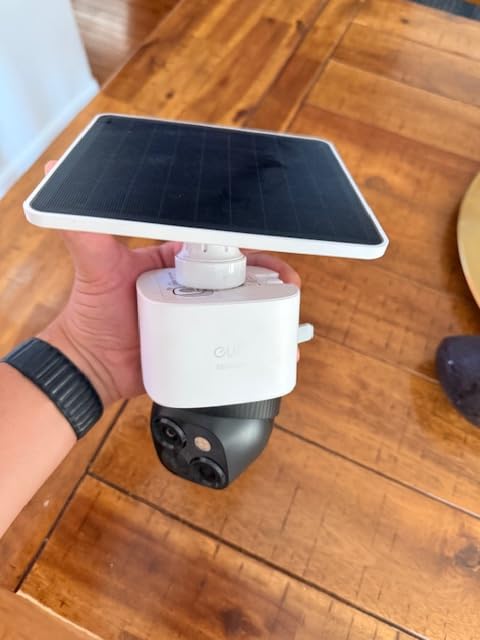
The SoloCam S340 sits at the premium end of Eufy’s wire-free lineup. Instead of a single fixed lens, it carries two: a wide-angle lens for the big picture and a telephoto lens that zooms in on faces, license plates and other details. A motorized head lets the camera rotate through a full circle and tilt up and down, so one unit can cover a driveway, a side gate and a front porch that would normally need two or three fixed cameras.
Power comes from a battery that is continuously topped up by a solar panel built into the top of the camera. No wiring, no outlet nearby, no ladder trips to swap batteries. Footage is saved locally on the camera, which means you are not forced into a monthly cloud plan just to see what happened last night.
| Feature | What You Get |
|---|---|
| Lenses | Dual lens: wide-angle plus telephoto |
| Resolution | 3K-class video |
| Movement | Full 360-degree pan with tilt |
| Power | Rechargeable battery with built-in solar panel |
| Storage | Onboard local storage, no required subscription |
| Connectivity | 2.4GHz Wi-Fi |
| Weather rating | Outdoor-rated weatherproof body |
| Extras | Spotlight, siren, two-way audio, AI detection |
If you are still deciding what type of solar camera fits your property, our roundup of the best solar security cameras puts the S340 in context alongside other popular options.
Why this camera exists in the first place
Most home security cameras force you to pick a compromise. Wired models give you reliable power but demand an outlet, a drill and sometimes an electrician. Battery models are easy to mount but turn you into a part-time maintenance worker, climbing a ladder every few weeks to swap or recharge a pack. The SoloCam S340 tries to remove both headaches at once: the solar panel handles power, and the motorized head handles coverage. That combination is what makes it interesting, and it is why the camera attracts people with awkward properties such as long driveways, detached garages, barns and cabins.
It is also a camera that rewards a little planning. A few minutes spent choosing the mounting location, checking Wi-Fi and thinking about what you actually want to see will make a bigger difference to your experience than any single spec on the box. We cover all of that below, section by section, so you can judge whether the S340 fits your situation rather than relying on marketing claims.
What is in the box
- The SoloCam S340 camera with its integrated solar panel
- Mounting bracket, screws and anchors
- Charging cable for an initial or backup top-up
- Quick-start guide and a mounting template
It is worth fully charging the battery before you mount it, even though the panel will do the job over time. Starting with a full battery means the camera is ready to record from the first minute and gives the solar panel a head start while it settles into its new routine.
Who this review is for
This review is written for homeowners, renters with outdoor space, small-property owners and anyone weighing a solar camera against a traditional wired or battery model. We focus on everyday performance rather than lab numbers: how the picture looks when you actually need it, how often you have to touch the camera after installation, and whether the features make a real difference to your sense of security. If you only skim one section, make it the solar and battery discussion, because that is where this camera differs most from the competition.
Check the current price of the Eufy SoloCam S340
View on Amazon2. Design and Build Quality
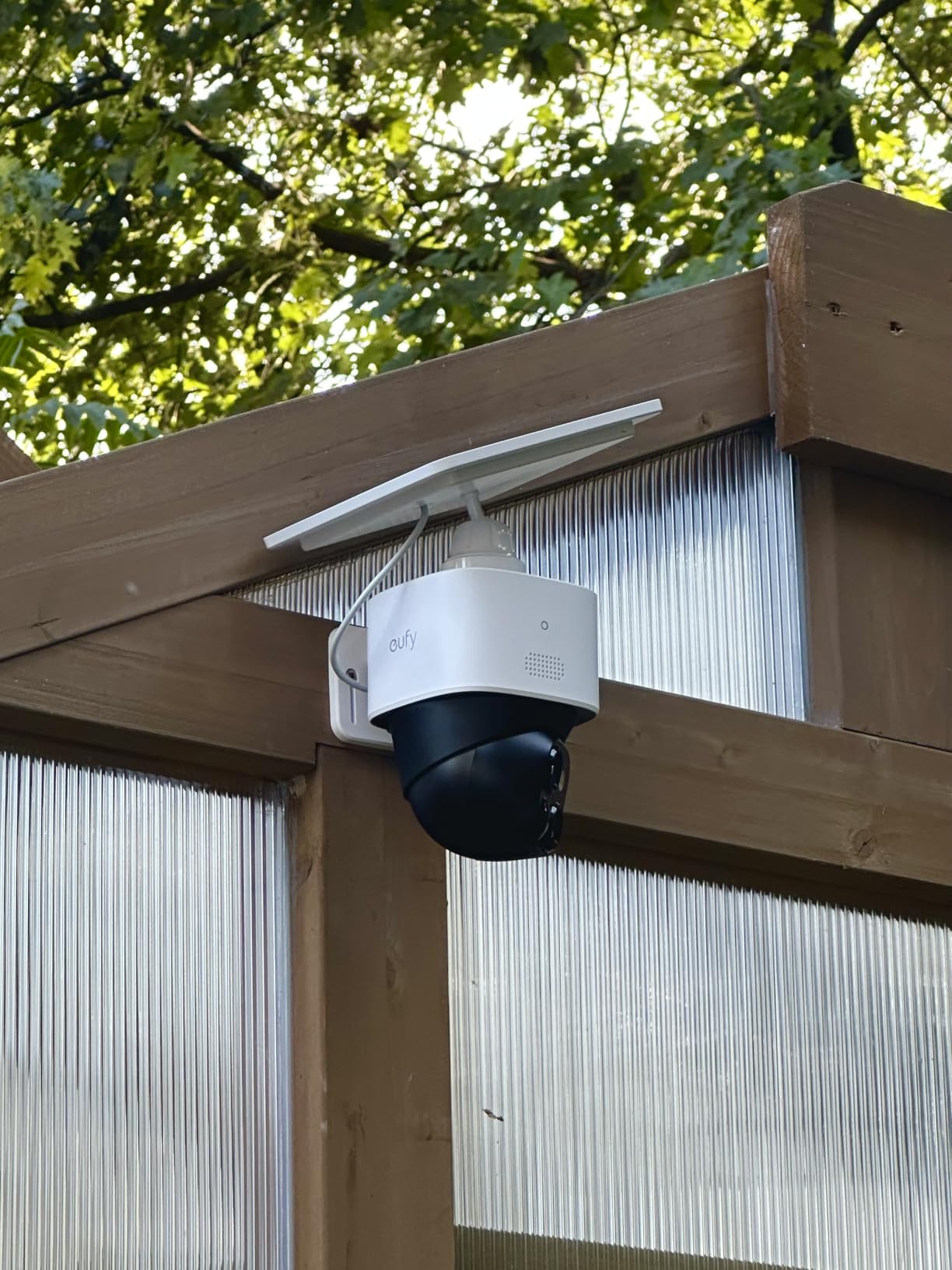
Out of the box, the S340 feels more like a small pan-tilt dome than the boxy battery cameras of a few generations ago. The housing is solid plastic with a matte finish that resists fingerprints and does not look cheap on a wall. The solar panel sits on top, angled so it can collect light without making the whole unit look bulky.
Because the camera head moves, the mounting bracket matters. Eufy includes a sturdy mount and screws, and the unit can also be placed on a flat surface such as a shed roof or porch rail. The weatherproof rating means rain, dust and typical summer heat or winter cold should not trouble it, though like any outdoor electronics it prefers a spot that is not constantly submerged in snow.
What stood out
- Compact footprint: noticeably smaller than you might expect given two lenses and a motor.
- Tool-light installation: mount, aim the panel, done.
- Clean look: neutral colors blend with siding, brick and fences.
The moving head and why it matters
Motorized cameras live or die by their mechanical quality. A noisy, wobbly head would be annoying and would eventually wear out. The S340’s motor is quiet in normal use, and the movement feels deliberate rather than jerky. When the camera swings to follow someone, you hear a soft whir, but nothing that will wake a light sleeper or alert a visitor from across the yard. The housing is sealed to keep moisture out of the rotating joint, which is the typical weak point on cheaper pan-tilt models.
Mounting options and placement
You can fix the camera to a wall, a fascia board, a post or a fence, or simply set it on a stable flat surface. Wall mounting is the most common choice because it keeps the camera out of reach and lets the solar panel angle toward the sky. Corner mounting gives the widest sweep across two sides of a building, while mounting under an eave protects against rain but may reduce solar charging, so there is a balance to strike.
Avoid mounting directly above heavy-traffic spots like a front door where people stand directly underneath, because the camera cannot tilt down far enough to see someone right at its base. Instead, place it a few meters back and slightly to the side, so it overlooks the approach path and the door at the same time.
See the SoloCam S340 on Amazon
Check Latest Price3. Video Quality and the Dual-Lens Advantage
The headline feature is the dual-lens setup. The wide lens gives you the establishing shot — the whole yard, the whole driveway. The second lens handles the zoom. Together they enable a hybrid zoom that stays far sharper than the digital zoom on a single-lens camera, where pinching in on a distant figure usually produces a blurry mess.
In daylight, footage is crisp with good color and sensible dynamic range. Bright skies do not blow out shadows under a porch roof as badly as on cheaper cameras. Faces at moderate distance are recognizable, and the telephoto lens is where the S340 genuinely earns its price: reading a delivery label or spotting a vehicle’s details becomes realistic instead of wishful.
| Scenario | Performance |
|---|---|
| Full-yard daytime view | Sharp, natural color |
| Zoomed-in face at a distance | Clearly better than single-lens digital zoom |
| Backlit scenes | Handled reasonably well, some glare at sunrise or sunset |
| Fast motion (cars) | Good, with minor softness at the edges |
Like every Wi-Fi camera, video quality depends on signal strength. A weak connection means compression and occasional lag, so the camera’s placement relative to your router is more important than the spec sheet suggests.
Understanding the hybrid zoom
Camera makers love to quote enormous zoom numbers, but they rarely explain that much of the zoom is just cropping a standard image. The S340 is different because the telephoto lens captures real optical detail at a distance. As you zoom in from the wide view, the camera blends the two lenses, then continues with a modest amount of digital enhancement. The first stretch of zoom looks genuinely sharp, and the final stretch gets softer, which is exactly what you would expect.
In practical terms, this means you can monitor a gate or a vehicle parked at the far end of a driveway and still pick up meaningful detail. You will not read a license plate from the other side of a football field, but at the distances of a normal residential property, the improvement over a single-lens camera is obvious.
Daytime versus evening footage
Color rendering during the day is natural and slightly warm. As the light fades toward dusk, the camera maintains a good balance before switching to its night mode. The transition is smooth, and there is no jarring flash or long delay. Shadows under trees and porch roofs retain some detail, thanks to decent HDR processing, although harsh sun behind a subject will still produce some silhouetting.
Tips for the sharpest picture
- Wipe the lenses periodically; dust and spider webs are the most common cause of blurry footage.
- Avoid aiming straight at a bright light or reflective wall.
- Keep the camera free of window glass if mounted indoors, because glare ruins both infrared and spotlight modes.
- Check your Wi-Fi signal if video looks pixelated rather than just soft.
Recording length and clip quality
Event clips are short by design, usually covering the moment of motion plus a few seconds before and after. That keeps files small and saves battery, but it also means you should adjust the clip length if you want to see how a visitor leaves as well as arrives. Longer clips use more power, so find a balance that suits your property. For most homes, the default setting captures everything useful without wasting storage.
Audio quality is respectable. Voices are clear at normal conversation distance, and the microphone filters out a fair amount of wind noise. Two-way talk has a slight delay, as with all Wi-Fi cameras, but it is perfectly usable for telling a courier where to leave a parcel or warning a stranger that they are being recorded.
Want the dual-lens zoom for your property?
Shop the SoloCam S3404. Pan, Tilt and Auto Tracking
A fixed camera sees one slice of the world. The S340 can rotate around and tilt up and down, either manually from the app or automatically. In live view you drag your finger across the screen and the camera swings to follow, which feels surprisingly like operating a professional PTZ unit.
The more useful feature is auto tracking. When the camera spots a person, it follows them as they move across the frame, keeping them centered instead of letting them walk out of view after two seconds. For a driveway or backyard, this is a real upgrade: you capture the full path of someone approaching rather than a sliver of them entering and exiting the frame.
Tracking is not magic. Very fast movement, or several people in the frame at once, can confuse it, and it is not designed to replace a professional guard system. But for everyday residential monitoring it is smooth and reliable.
Manual control from the app
Live view is where the pan and tilt controls shine. Swiping across the screen rotates the camera, and tapping a preset position returns it to a favorite angle. You can save patrol positions, for example the driveway, the side gate and the back door, and switch between them in seconds. For checking on a delivery or watching a pet in the yard, this flexibility feels closer to a small surveillance station than a basic doorbell camera.
How auto tracking behaves in the real world
When the camera detects a person, it locks on and follows them with smooth, measured movements. A walker crossing the yard is kept near the center of the frame, and the camera returns to its home position after the activity ends. The system is tuned to avoid constant twitching, which makes recordings far easier to watch than clips from cheaper cameras that jerk around at every shadow.
There are limits. If someone moves behind a tree and out of sight, tracking can lose them. If two people walk in opposite directions, the camera picks one. And a very fast runner may outpace the motor for a moment. None of these are deal-breakers, but they are good reminders that auto tracking improves coverage rather than guaranteeing a perfect shot every time.
Why the home position matters
Because the camera returns to a default position, choose that position deliberately. Point it at your highest-priority area, such as the front entrance or the driveway, so that any activity there is recorded from the very first second instead of waiting for the head to swing into place.
Get 360-degree coverage from one camera
See It on Amazon5. Solar Panel and Battery Life
This is where the S340 differs from most security cameras. The solar panel is integrated, so there is no separate panel with a cable to route and weatherproof. In decent daily sunlight, a modest amount of direct light keeps the battery topped up indefinitely. Eufy’s own guidance points to a few hours of direct sun each day as the sweet spot.
If you want a deeper grounding in how this kind of power works, our explainer on how solar lights work covers the same photovoltaic basics, and our guide on whether solar security cameras are any good tackles the honest pros and cons of going wireless.
What affects real-world battery performance
- Sun exposure: a south-facing (northern hemisphere) wall with no trees overhead is ideal.
- Activity level: a busy street triggers more recordings, draining the battery faster.
- Tracking and live view: motors and streaming use more power than idle standby.
- Season: short winter days and heavy cloud cover reduce solar input.
- Temperature: very cold weather reduces battery efficiency temporarily.
For a shaded porch, the camera will still work, but you will probably need to top up the battery occasionally via the charging port. Think of the solar panel as extending runtime dramatically rather than as a guarantee of infinite operation in every location.
A realistic look at solar charging
Solar power is wonderful when conditions cooperate and merely adequate when they do not. A camera in a sunny location may hover near a full battery for weeks without any intervention. A camera tucked under a deep porch roof or beside a tall hedge may slowly lose charge, especially if it is busy with frequent motion events. The good news is that the S340’s battery is large enough to carry it through cloudy stretches, and a quick top-up with the cable restores it fully when necessary.
Quick sun-check before you drill
- Visit the mounting spot at midday and note how much direct sun hits it.
- Return mid-morning and mid-afternoon to see whether trees or buildings cast shade.
- Think about the seasons, because the sun sits lower in winter and shadows grow longer.
- If sunlight is limited, consider a different wall or a free-standing post away from obstructions.
Keeping the panel efficient
A dirty panel absorbs less light. Dust, pollen, bird droppings and snow all cut charging efficiency. A quick wipe with a damp cloth a few times a year keeps things working at their best. In winter, brush off snow when it is safe to do so, and remember that a bright overcast day still provides more light than you might think.
If you are curious how this compares to larger solar products, our guide on how a solar powered generator works shows the same principle scaled up for powering appliances.
Seasonal expectations
Spring and summer are easy: long days and high sun mean the panel quickly replenishes whatever the camera uses. Autumn brings shorter days and more cloud, so charging slows. Winter is the real test, particularly in northern regions where the sun stays low and daylight is brief. In those months, plan to check the battery level more often, clear snow from the panel and consider moving the camera to a brighter wall if charging cannot keep up. Many owners find that a single manual top-up before winter is all they need.
Never swap batteries again
Check Price on Amazon6. Night Vision and Spotlight Performance
Night performance is where many wireless cameras fall apart, so it is worth looking carefully. The S340 offers both infrared night vision and a built-in spotlight that can trigger color footage. In plain infrared mode you get black-and-white video with good detail inside the range of the IR emitters. When the spotlight kicks in, the image switches to full color, which is far more useful for describing clothing or a vehicle to the police.
The spotlight also acts as a deterrent: nothing discourages a snooper quite like suddenly being lit up. You can choose how and when the light activates in the app, which is helpful if you do not want your neighbors’ windows illuminated every time a cat strolls by.
| Night Mode | Output | Best For |
|---|---|---|
| Infrared | Black-and-white, discreet | General monitoring, saving battery |
| Spotlight color | Full-color footage | Identifying clothing, vehicles, details |
| Siren | Loud audible alert | Deterring intruders |
Keep in mind that spotlight use consumes more power. If your camera lives in a lower-sun spot, favor infrared and reserve the spotlight for specific zones.
Infrared in practice
Infrared night vision works by illuminating the scene with light that human eyes cannot see, then capturing the reflection. The S340 does a good job inside its effective range, producing clear, evenly lit footage of people and vehicles. Beyond that range, the image fades into darkness, so it is wise to place the camera relatively close to the areas you care about most. Reflective surfaces such as white garage doors or shiny cars can create a glare effect, so test the aim after dark before you call the installation finished.
Making the most of the spotlight
Color night footage is a major advantage when you need to describe an intruder, identify a vehicle or confirm that the person at the gate is actually a delivery driver. The spotlight turns on when motion is detected, and the camera then records in full color. Because it announces itself, it works as a deterrent too. Many incidents end the moment the light snaps on.
You can also set the light to behave differently depending on the time of day or the type of activity. For example, you might allow the spotlight for people only and keep it off for pets and passing cars. This preserves battery and avoids annoying neighbors.
Using the siren wisely
The built-in siren is loud enough to startle someone standing a few meters away. It can be triggered manually from the app if you spot something suspicious in live view, or automatically in response to certain alerts. Test it once at a convenient time so you know how it sounds, and consider your neighbors before enabling automatic triggers on a busy street.
Color night footage without wiring
View the SoloCam S3407. AI Detection and Smart Alerts
Notification fatigue kills security cameras. If your phone buzzes every time a leaf blows past, you will mute the app within a week. The S340 uses on-device AI to distinguish between people, pets and general motion, so alerts can be limited to what actually matters.
You can draw activity zones to exclude the street or a neighbor’s property, set sensitivity levels, and schedule when detection is active. Combined with auto tracking, the result is a camera that is selective about when it wakes up and what it records — which also helps battery life.
Useful alert settings to try first
- Limit alerts to people only for the first week, then expand if you want pet notifications.
- Exclude public sidewalks and roads using activity zones.
- Use scheduled modes so the camera is quieter when you are home and on alert when you are away.
Eufy’s detection is processed locally on the device rather than being sent to a cloud service first, which is part of why alerts tend to be quick.
People, pets and everything else
The AI engine on the S340 looks for the shape and movement of people, and also recognizes pets and, depending on settings, other common motion. In daily use this means far fewer meaningless notifications. A tree branch swaying in the wind or headlights sweeping across the yard are largely ignored, while a person approaching the front door produces a prompt alert and a clean clip.
Activity zones that actually help
Activity zones let you draw boxes on the live image to define where motion should count. Exclude the road and sidewalk to avoid constant notifications from passers-by, and focus on your driveway, doorway and yard instead. Because the camera can move, remember to set zones for each position you use frequently.
Notification strategy
- While you are home: limit alerts to the entry points or switch them to silent push notifications.
- While you are away: expand the zones and enable all detection types.
- Overnight: use the spotlight and siren more aggressively if you live in a quiet area.
Spending twenty minutes tuning these settings in the first week prevents notification fatigue and builds trust in the system. It is the difference between a camera you rely on and one you stop looking at.
Smarter alerts, fewer false alarms
Shop on Amazon8. Storage, Privacy and the No-Subscription Advantage
One of the biggest reasons to consider Eufy is how it treats your footage. Video is stored locally on the camera itself, so you are not paying monthly to unlock your own recordings. For a household running several cameras, avoiding a recurring fee for each can add up to real savings over time.
Local storage also has a privacy upside: your clips are not sitting by default on a third-party server. The trade-off is that if someone steals the camera, the footage goes with it, so mounting it out of easy reach matters. Eufy also offers optional cloud backup for people who want an off-site copy, but it is not required for the camera to be useful.
| Approach | Monthly Cost | Footage Location |
|---|---|---|
| Local storage (default) | None required | On the camera |
| Optional cloud backup | Paid plan | Off-site server |
| Subscription-first cameras | Often required for full features | Cloud |
How much footage can you keep?
Onboard storage is finite, so the camera records in a loop. When space runs low, the oldest clips are overwritten by new ones. For a typical residential property with moderate activity, that usually means a good number of days of event clips, although the exact amount depends on how many triggers you get and what quality you choose. If you want to keep a clip permanently, download it to your phone straight away.
Privacy considerations
Local storage reduces the amount of personal footage in the cloud, but you should still protect your account with a strong password and two-factor authentication. Think about where the camera points as well. Aim it at your own property, avoid capturing neighbors’ windows or private areas, and check local rules about recording audio and video. Being a considerate neighbor is part of responsible security.
Why avoiding subscriptions matters
Monthly fees may seem small, but they multiply quickly across several cameras and several years. A subscription-free camera effectively costs its purchase price and nothing more, which makes the premium upfront price easier to justify. Over time, the savings can be larger than the cost of the camera itself, particularly for families with multiple locations to cover.
Sharing and exporting clips
When something important happens, you can save a clip to your phone with a couple of taps and send it to a family member, a neighbor or the police. Exported files play on any modern device, so there is no special viewer to install. Keep in mind that if you are sharing footage that includes other people, it is polite and sometimes legally required to handle it responsibly.
Own your footage, skip the monthly fee
Check the Price9. Setup and App Experience
Setup follows the usual Eufy pattern: download the app, create an account, scan the QR code on the camera and connect it to your Wi-Fi. The key detail is that the camera uses a 2.4GHz network. If your router merges 2.4GHz and 5GHz into one name, you may need to temporarily split them or use the router’s settings during pairing.
Before drilling holes, test the signal. Hold the camera at the intended spot and check the signal bars in the app. A weak signal is the number one cause of lag and dropped clips on any wireless camera. If it is borderline, a mesh node or Wi-Fi extender near the mounting point solves it cheaply.
Mounting checklist
- Pick a spot with several hours of direct daily sun.
- Confirm Wi-Fi signal at that exact location.
- Mount roughly two to three meters up, out of casual reach.
- Aim the panel at the sun’s path and leave room for the head to rotate.
- Set activity zones and test the alerts before you trust it.
The app is clean and quick to learn. Live view loads in a couple of seconds, the timeline is easy to scrub, and it integrates with Alexa and Google Assistant for voice-based live viewing on smart displays.
Step-by-step first-time setup
- Charge the battery fully using the supplied cable.
- Install the app and create your account.
- Add a new device and scan the QR code on the camera.
- Join your 2.4GHz Wi-Fi network and wait for the confirmation sound.
- Update the firmware if prompted before mounting.
- Take the camera to its mounting spot and check the signal strength.
- Mount it, aim the panel, and set your detection zones.
Common setup stumbles
Most failed pairings come down to the Wi-Fi band. If the camera will not connect, check that you are entering the correct password, that your phone is on the same network, and that the router is not hiding the 2.4GHz band. A quick restart of both the camera and the router often resolves stubborn problems.
Living with the app day to day
After setup, the app becomes a straightforward dashboard. The home screen shows a thumbnail of each camera, the battery level and solar status, and any new events. You can scroll a timeline, favorite important clips and share them with family members. If several people live in the house, create separate accounts or share access so everyone receives alerts without sharing a single login.
Easy setup, no wiring required
See It on Amazon10. How the SoloCam S340 Compares to Other Solar Cameras
The solar camera market has grown quickly, with Eufy, Reolink, Arlo and Ring all competing for the same driveway. Each makes different trade-offs: Ring leans on ecosystem integration and subscriptions, Arlo on polished software, and Reolink on value. Eufy’s pitch is local storage plus dual lenses plus a built-in panel.
If you want a direct head-to-head, read our Reolink vs Arlo vs Eufy solar cameras comparison. For a look at a more subscription-oriented rival, our Ring Stick Up Cam Solar review covers what you get and what you pay for.
| Factor | Eufy SoloCam S340 | Typical Single-Lens Solar Camera |
|---|---|---|
| Lenses | Dual (wide + telephoto) | Single |
| Pan / tilt | Yes, motorized | Usually fixed |
| Solar panel | Built in | Often separate or optional |
| Local storage | Yes | Varies |
| Subscription needed | No | Often for full features |
Where Eufy pulls ahead
Dual-lens zoom and built-in pan and tilt are still relatively rare in the solar camera category. Many competitors offer a fixed single lens, which means you either choose a narrow view with good detail or a wide view with little. The S340 delivers both. Local storage is the other differentiator, particularly against brands that tie smart features to a paid plan.
Where rivals may be a better fit
If you already live inside another ecosystem, such as a home full of Ring or Arlo devices, the convenience of one app may outweigh the S340’s hardware advantages. And if you only need to watch a single doorway, a simpler fixed camera can do that job for less money. Those considerations are why we suggest reading our roundup of the best solar security cameras before you make a final decision.
Total cost of ownership
| Cost Item | S340 | Subscription-based Alternative |
|---|---|---|
| Camera purchase | Premium | Often lower |
| Monthly plan | Not required | Commonly recurring |
| Batteries / wiring | None needed | Often needed |
| Multi-camera scaling | Cost stays flat | Fees can stack up |
See why it stands out from the crowd
Check Latest Price11. Pros and Cons at a Glance
What We Like
- Dual lenses with strong zoom detail
- 360-degree pan and tilt with auto tracking
- Built-in solar panel keeps it running
- Local storage, no required subscription
- Color night footage with the spotlight
- Quick, selective AI alerts
What Could Be Better
- 2.4GHz Wi-Fi only
- Needs a reasonably sunny mounting spot
- Footage lives on the camera if it is stolen
- Premium price versus basic fixed cameras
- Tracking can struggle with crowds
The honest trade-offs
No camera is perfect, and the S340 is no exception. Its biggest strengths, the dual lens and solar panel, also create its biggest requirements: you need sunshine and a decent Wi-Fi signal. If you can meet those two conditions, the downsides shrink to minor quibbles. If you cannot, the camera may frustrate you regardless of how good its hardware is.
Common owner complaints to be aware of
- Occasional delays when waking the camera for live view, which is typical for battery-powered models.
- Notifications that need tuning before they become genuinely useful.
- Limited effectiveness in deep shade without manual charging.
None of these are unique to the S340, and most can be reduced with careful placement and settings.
Decide for yourself — check the current price
View on Amazon12. Who Should Buy the SoloCam S340 (and Who Should Skip It)
Buy it if you have a driveway, yard or side gate that needs wide coverage, you want detail on faces and vehicles, you dislike monthly fees, and you have a spot with a few hours of daily sun. It is especially good for rural homes, sheds, barns and holiday properties where running power is impractical.
Consider alternatives if your only mounting spot is deep shade, your Wi-Fi is weak or 5GHz-only, or you just need a basic cheap camera watching one doorway. In those cases a simpler wired or battery-only model may fit better.
If you like the solar approach in general, you may also enjoy exploring other ways to harness the sun around your home, such as the best solar lights for your garden, which pair nicely with a camera for a brighter, safer yard.
Best use cases
- Long driveways and rural properties: where wiring is impractical and range matters.
- Sheds, barns and workshops: places with no nearby outlet.
- Vacation homes: low-maintenance monitoring while you are away.
- Backyards and pools: wide coverage with the option to zoom in.
Our overall rating
For video quality, flexibility and long-term running costs, the SoloCam S340 earns a strong recommendation. It is not the cheapest camera you can buy, but it is one of the most capable wire-free options for people who value coverage and independence. If you are ready to stop worrying about batteries and monthly fees, it is an easy camera to live with.
A quick buying checklist
- Confirm you have a sunny mounting spot.
- Verify a solid 2.4GHz Wi-Fi signal there.
- Decide which areas you most need to cover.
- Plan to mount it high and secure.
- Spend a little time tuning alerts after installation.
Final word on value
The price may look steep next to a basic fixed camera, but you are paying for a whole system: two lenses, a motor, a solar panel, local storage and smart detection, all without recurring charges. When you add up the hardware you would otherwise need to buy, and the subscription fees you would otherwise pay, the S340 starts to look quite reasonable. It is a camera built for people who want to install it once and trust it afterwards.
Ready to upgrade your outdoor security?
Get the SoloCam S340Frequently Asked Questions
Does the Eufy SoloCam S340 really work without any wiring?
Yes. It runs on an internal rechargeable battery that the built-in solar panel keeps topped up. You only need Wi-Fi coverage at the mounting spot.
Is there a monthly subscription fee?
No subscription is required. Footage is stored locally on the camera, and optional cloud backup is available if you want an off-site copy.
How much sunlight does it need?
A few hours of direct sun per day is generally enough to maintain the battery under typical use. Shaded locations or very short winter days may require occasional manual charging.
Does it work with 5GHz Wi-Fi?
No, it connects to 2.4GHz networks. If your router combines both bands, you may need to separate them during setup.
Can it track people automatically?
Yes. Auto tracking follows a detected person as they move, using the camera’s pan and tilt motors.
How good is the night vision?
Infrared mode provides clear black-and-white footage, and the spotlight can switch the camera to full-color night video for more detail.
Is it waterproof?
It carries an outdoor weatherproof rating suited to rain and dust. It is designed for year-round use, though mounting it above ground level is still wise.
Can I talk to visitors through it?
Yes, two-way audio lets you listen and speak through the app, and a built-in siren can be triggered manually or automatically.
Does it work with Alexa or Google Assistant?
Yes, it can integrate with both for viewing live feeds on compatible smart displays and speakers.
What happens if the camera is stolen?
Because footage is stored locally, the recordings leave with the camera. Mount it high and consider optional cloud backup for added protection.
Is a solar camera better than a wired one?
It depends. Solar cameras are easier to install and place anywhere with sun and Wi-Fi, while wired cameras never depend on sunlight. Our article on whether solar security cameras are any good explores the trade-offs.
How many cameras do I need for a typical home?
Thanks to its pan-and-tilt range, one S340 can often do the work of two or three fixed cameras covering a driveway and front yard. Larger properties may still benefit from additional units.
Final Thoughts
The Eufy SoloCam S340 is a genuinely capable wire-free camera: sharp dual-lens video, smooth tracking, strong night performance and a solar panel that removes most of the maintenance. The lack of required subscription is the cherry on top, especially if you plan to cover more than one area. It asks for a decent mounting location and a stable 2.4GHz connection, but if you can provide those, it is easy to recommend.
Take a look at the SoloCam S340 today
Check the Price on Amazon